Code
# install.packages(c("tidyverse", "readr", "rstudioapi", "stringr"))Text files are the simplest form of documentation. However, they are susceptible to encoding and structural issues that impede interoperability.
//
Les fichiers texte constituent la forme la plus simple de documentation. Ils sont toutefois sujets à des problèmes d’encodage et de structure qui nuisent à leur interopérabilité.
Ensure universal readability of text documents. Our objective is to validate UTF-8 encoding, identify “invisible” characters (BOM), and normalize line endings to ensure documents remain readable across all operating systems. // Garantir la lisibilité universelle des documents texte. Notre objectif est de vérifier l’encodage UTF-8, d’identifier les caractères « invisibles » (BOM) et de normaliser les fins de ligne afin de garantir que les documents restent lisibles sur tous les systèmes d’exploitation.
Character corruption (“Mojibake”) caused by legacy encodings (e.g., Windows-1252) and “link rot” from broken external URLs are the primary threats to the long-term usability of plain text documentation. // La corruption des caractères (« Mojibake ») due à des encodages obsolètes (par exemple, Windows-1252) et la « pourriture des liens » résultant d’URL externes inactives constituent les principales menaces pour la pérennité de la documentation en texte brut.
This notebook evaluates text files on three levels:
//
Ce notebook analyse les fichiers texte à trois niveaux :
We use readr for encoding detection and stringr for link extraction.
//
Nous utilisons readr pour la détection des encodages et stringr pour l’extraction des liens.
The following R packages are required. If you don’t have these packages, uncomment this code and run it once in your R console:
//
Les packages R suivants sont requis. Si vous ne disposez pas de ces packages, décommentez ce code et exécutez-le une fois dans votre console R :
# install.packages(c("tidyverse", "readr", "rstudioapi", "stringr"))library(tidyverse)
library(readr) # For encoding guessing
library(stringr) # For Regex (Links/Emails)
library(rstudioapi) # For directory selectionThis block allows for interactive selection of the image directory. If running in a non-interactive environment, it defaults to the path defined in the YAML header.
//
Ce bloc permet de sélectionner de manière interactive le répertoire contenant les images. En cas d’exécution dans un environnement non interactif, le chemin par défaut est celui défini dans l’en-tête YAML.
# 1. Try to select interactively if in RStudio
if (interactive() && .Platform$OS.type == "windows") {
  selected_dir <- rstudioapi::selectDirectory(caption = "Select Excel Directory")
} else {
  selected_dir <- NULL
}

# 2. Logic to determine final directory (Interactive vs Parameter)
if (!is.null(selected_dir)) {
  target_dir <- selected_dir
} else {
  target_dir <- params$target_dir
}

print(paste("Analyzing directory:", target_dir))
[1] "Analyzing directory: data/Inspect_Text/"We scan for .txt, .md, .csv, and .rmd files. The inspection extracts encoding confidence, checks for the hidden BOM, identifies line endings, and scans for PII (Emails).
//
Nous recherchons les fichiers aux extensions .txt, .md, .csv et .rmd. L’analyse évalue la fiabilité de l’encodage, vérifie la présence d’une nomenclature cachée, identifie les fins de ligne et recherche les données à caractère personnel (courriels).
message("Generating Text Report...")

text_files <- list.files(
  path = target_dir,
  pattern = "\\.(txt|md|csv|rmd)$",
  recursive = TRUE,
  full.names = TRUE,
  ignore.case = TRUE
)

# Regex Patterns
url_pattern <- "http[s]?://(?:[a-zA-Z]|[0-9]|[$-_@.&+]|[!*\\(\\),]|(?:%[0-9a-fA-F][0-9a-fA-F]))+"
email_pattern <- "[a-zA-Z0-9._%+-]+@[a-zA-Z0-9.-]+\\.[a-zA-Z]{2,}"

report <- purrr::map_dfr(text_files, function(file_path) {

  fname <- basename(file_path)

  tryCatch({
    # 1. BOM Detection (Read raw bytes)
    con <- file(file_path, "rb")
    bytes <- readBin(con, "raw", n = 4)
    close(con)

    # Check for UTF-8 BOM (EF BB BF)
    has_bom <- identical(bytes[1:3], as.raw(c(0xef, 0xbb, 0xbf)))

    # 2. Encoding Guess
    guess <- readr::guess_encoding(file_path, n_max = 1000)[1, ]
    encoding <- if (!is.na(guess$encoding)) guess$encoding else "Unknown"
    confidence <- if (!is.na(guess$confidence)) guess$confidence else 0

    # 3. Content Analysis (Read text)
    # Read safely with UTF-8 fallback
    content_lines <- readLines(file_path, warn = FALSE)
    full_text <- paste(content_lines, collapse = "\n")

    # 4. Line Ending Detection
    # We read raw again to distinguish \r\n vs \n (readLines normalizes them)
    raw_text <- readChar(file_path, nchars = 2000, useBytes = TRUE)
    eol_type <- "Unknown"
    if (grepl("\r\n", raw_text)) {
      eol_type <- "Windows (CRLF)"
    } else if (grepl("\n", raw_text)) {
      eol_type <- "Unix (LF)"
    } else if (grepl("\r", raw_text)) {
      eol_type <- "Classic Mac (CR)"
    }

    # 5. Extract Artifacts
    urls <- str_extract_all(full_text, url_pattern)[[1]]
    emails <- str_extract_all(full_text, email_pattern)[[1]]

    example_links <- paste(head(unique(urls), 3), collapse = ", ")

    tibble(
      FileName = fname,
      Encoding = encoding,
      Confidence = confidence,
      HasBOM = has_bom,
      LineEndings = eol_type,
      LineCount = length(content_lines),
      URL_Count = length(urls),
      Email_Count = length(unique(emails)),
      Example_Links = substr(example_links, 1, 100),
      Status = "Success"
    )

  }, error = function(e) {
    tibble(
      FileName = fname, Encoding = NA, Confidence = NA, HasBOM = NA,
      LineEndings = NA, LineCount = NA, URL_Count = NA, Email_Count = NA,
      Example_Links = NA, Status = paste("Failed:", e$message)
    )
  })
})

# Display preview
print("--- Text Report Preview ---")
[1] "--- Text Report Preview ---"head(report)# A tibble: 6 × 10
FileName Encoding Confidence HasBOM LineEndings LineCount URL_Count
<chr> <chr> <dbl> <lgl> <chr> <int> <int>
1 14_corr_ring_stats… ASCII 1 FALSE Unix (LF) 12 0
2 388_corr_ring_stat… ASCII 1 FALSE Unix (LF) 11 0
3 413_corr_ring_stat… ASCII 1 FALSE Unix (LF) 13 0
4 File_tree.txt UTF-8 1 FALSE Unix (LF) 146 0
5 README_v2.txt UTF-8 1 FALSE Unix (LF) 783 14
6 readme.md ASCII 1 FALSE Unix (LF) 31 1
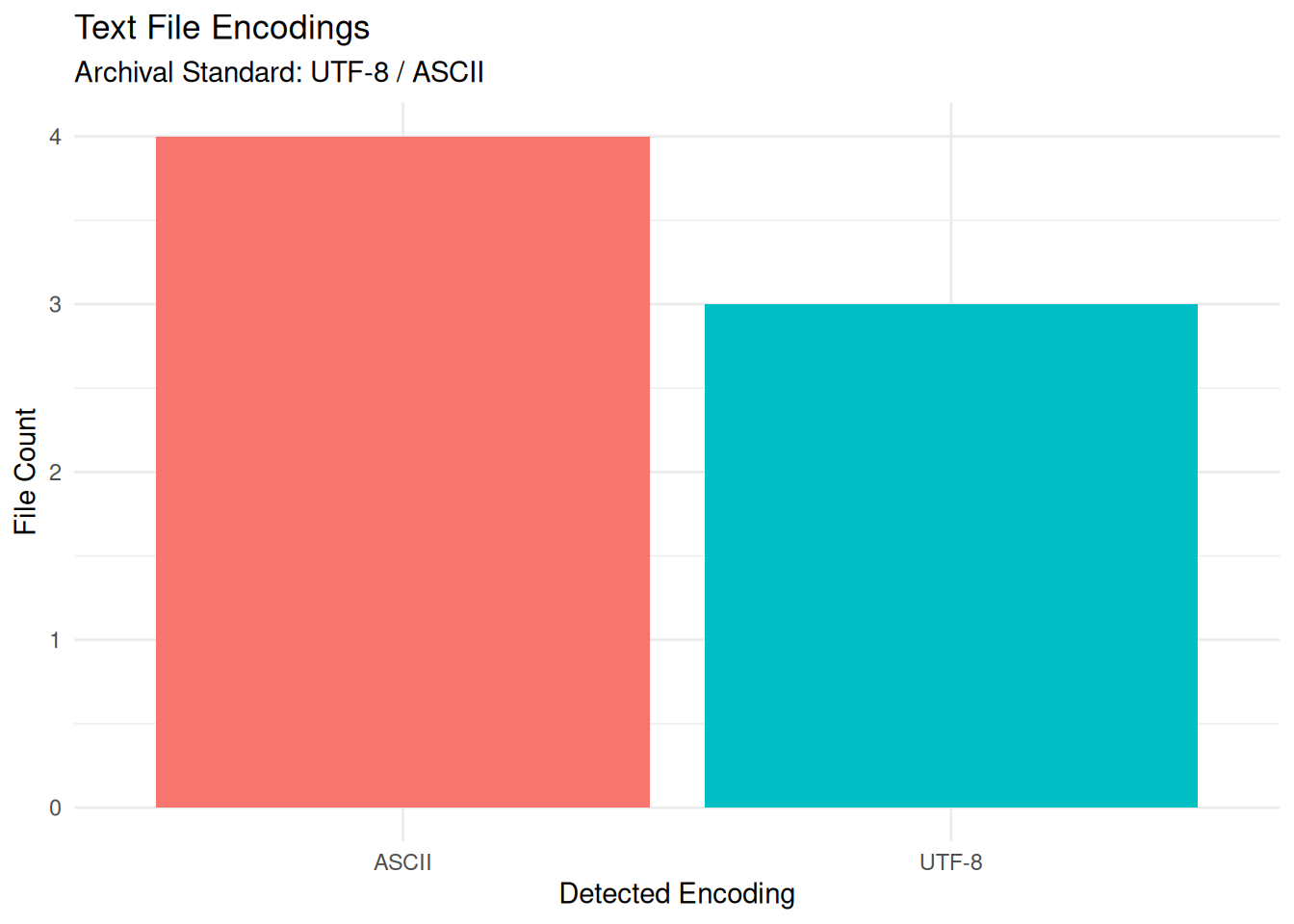
# ℹ 3 more variables: Email_Count <int>, Example_Links <chr>, Status <chr>We can visualize the distribution of detected encodings. Ideally, the repository should be 100% UTF-8 (or ASCII). Any “ISO-8859” or “Windows-1252” files are candidates for remediation.
//
Nous pouvons visualiser la répartition des encodages détectés. Idéalement, le référentiel devrait être entièrement au format UTF-8 (ou ASCII). Tout fichier au format « ISO-8859 » ou « Windows-1252 » doit faire l’objet d’une correction.
if (nrow(report) > 0) {
  ggplot(report %>% filter(Status == "Success"), aes(x = Encoding, fill = Encoding)) +
    geom_bar() +
    labs(
      title = "Text File Encodings",
      subtitle = "Archival Standard: UTF-8 / ASCII",
      x = "Detected Encoding",
      y = "File Count"
    ) +
    theme_minimal() +
    theme(legend.position = "none")
}
output_dir <- "Results/Inspect_Text"
dir.create(output_dir, recursive = TRUE, showWarnings = FALSE)

output_file <- file.path(output_dir, paste0("Text_Report_", format(Sys.Date(), "%Y%m%d"), ".csv"))

write.csv(report, output_file, row.names = FALSE)
print(paste("Report saved to:", output_file))
[1] "Report saved to: Results/Inspect_Text/Text_Report_20260703.csv"Use the generated CSV to perform these checks:
PII Check (Email_Count > 0): Text files (especially READMEs) often contain contact information. Verify if these emails are personal (e.g., gmail.com) or professional.
Encoding (Encoding != UTF-8): Legacy files (Windows-1252) or other encodings may display corrupted characters on the web. It is recommended to convert them to UTF-8 using procedures like iconv (see below).
BOM (HasBOM = TRUE): The Byte Order Mark (BOM) is often unnecessary for UTF-8 and can break some scripts (e.g., shebang lines in bash). Curators can remove the BOM if the file is intended for code execution. Confirm with the researcher that these are safe to remove.
//
Utilisez le fichier CSV généré pour effectuer les vérifications suivantes :
Vérification des données à caractère personnel (Email_Count > 0) : Les fichiers texte (en particulier les fichiers README) contiennent souvent des coordonnées. Vérifiez si ces adresses e-mail sont personnelles (par exemple, gmail.com) ou professionnelles.
Encodage (Encoding != UTF-8) : Les fichiers hérités (Windows-1252) ou d’autres encodages peuvent afficher des caractères corrompus sur le Web. Il est recommandé de les convertir en UTF-8 à l’aide de procédures telles que iconv (voir ci-dessous).
BOM (HasBOM = TRUE) : La marque d’ordre des octets (BOM) est souvent inutile pour l’UTF-8 et peut perturber certains scripts (par exemple, les lignes shebang dans bash). Les conservateurs peuvent supprimer la BOM si le fichier est destiné à l’exécution de code. Vérifiez auprès du chercheur que leur suppression ne présente aucun risque.
iconv: The standard command-line tool for converting text encodings (e.g., iconv -f WINDOWS-1252 -t UTF-8 in.txt > out.txt).
dos2unix: A tool to normalize line endings (converting Windows CRLF to Unix LF). This may be useful for ensuring scripts run correctly on Linux clusters.
Internet Archive Wayback Machine: Use this website to find live versions of broken URLs.
//
iconv : L’outil en ligne de commande standard pour convertir les encodages de texte (par exemple, iconv -f WINDOWS-1252 -t UTF-8 in.txt > out.txt).
dos2unix : Un outil permettant de normaliser les fins de ligne (en convertissant les CRLF de Windows en LF d’Unix). Cela peut s’avérer utile pour garantir le bon fonctionnement des scripts sur les clusters Linux.
Internet Archive Wayback Machine : utilisez ce site web pour trouver des versions actives d’URL qui ne fonctionnent plus.
For users who want to run this analysis on a server, in a batch job, or from the command line, here is a pure R script that performs the same process.
Download the R Script: Inspect_Text_Script.R
//
Pour les utilisateurs qui souhaitent exécuter cette analyse sur un serveur, dans le cadre d’un traitement par lots ou depuis la ligne de commande, voici un script R pur qui effectue le même processus.
Télécharger le script R : Inspect_Text_Script.R
Inspect_Text_submit.sh
#!/bin/bash
#SBATCH --job-name=text_check
#SBATCH --nodes=1
#SBATCH --ntasks=1
#SBATCH --time=00:15:00
#SBATCH --mem=4G
#SBATCH --output=logs/text_check_%j.log

module load R

# Define target directory
TARGET_DIR="/scratch/user/project_data/docs"

# Prepare folders
mkdir -p Results/Inspect_Text
mkdir -p logs

# Run
echo "Starting Text Inspection on $TARGET_DIR"
Rscript Inspect_Text_Script.R "$TARGET_DIR"