Code
# install.packages(c("tidyverse", "hdf5r", "rstudioapi"))This notebook checks Hierarchical Data Format version 5 (HDF5) files (.h5, .hdf5). Unlike flat text files, HDF5 is a binary container that functions like a hard drive, capable of storing complex hierarchies of data within a single object.
Map the internal filesystem-like structure to inventory groups, datasets, and attributes, ensuring that the internal hierarchy is well-documented and remains navigable for future research.
As a binary format, HDF5 is a black box. Data can be locked behind proprietary compression filters or rely on external links that break when files are moved. Without appropriate documentation, the internal layout is effectively invisible to standard archival tools.
Curation Objectives:
We use the hdf5r package, which provides an object-oriented interface to the HDF5 library.
If you do not have the required packages, run this command once in your R console:
# install.packages(c("tidyverse", "hdf5r", "rstudioapi"))library(tidyverse)
library(hdf5r) # Interface to HDF5 library
library(DT) # Interactive tables
library(rstudioapi) # Directory selection
# Validation: Check if hdf5r loaded correctly
if (!require("hdf5r", quietly = TRUE)) {
stop("The 'hdf5r' package is missing. Please install it to proceed.")
}We select the folder containing the HDF5 files.
Note: If running interactively, a dialog box will appear. Otherwise, it defaults to the target_dir parameter.
# 1. Try to select interactively if in RStudio
if (interactive() && .Platform$OS.type == "windows") {
  selected_dir <- rstudioapi::selectDirectory(caption = "Select HDF5 Directory")
} else {
  selected_dir <- NULL
}

# 2. Logic to determine final directory
if (!is.null(selected_dir)) {
  target_dir <- selected_dir
} else {
  target_dir <- params$target_dir
}

print(paste("Analyzing directory:", target_dir))
[1] "Analyzing directory: data/Inspect_hdf5/"We scan the directory for files ending in .h5 or .hdf5.
hdf5_files <- list.files(
  path = target_dir,
  pattern = "\\.(h5|hdf5)$",
  recursive = TRUE,
  full.names = TRUE,
  ignore.case = TRUE
)

print(paste("Found", length(hdf5_files), "HDF5 files."))
[1] "Found 2 HDF5 files."head(hdf5_files)[1] "data/Inspect_hdf5//model-134-wire-e8e71fc090141d7c6fb334359152d295.hdf5"
[2] "data/Inspect_hdf5//model-272-general-e5ce2d69b035975cb5336cec0da9a32a.hdf5"We iterate through each file to map its internal contents. This routine extracts not just dimensions, but also storage layouts and compression filters.
Key Technical Checks:
Filters: We check the “creation property list” of every dataset to see if compression (e.g., GZIP, SZIP) is active.
Link Type: We flag H5L_TYPE_EXTERNAL to warn about potential missing dependencies.
message("Generating Data Dictionary...")

analyze_hdf5_structure <- function(file_path) {
  fname <- basename(file_path)

  tryCatch({
    # Open File (Read-Only)
    h5f <- H5File$new(file_path, mode = "r")
    on.exit(h5f$close_all()) # Ensure closure even if errors occur

    # 1. List all objects recursively
    # The 'ls' function returns a dataframe with columns: name, link.type, obj.type, etc.
    contents <- h5f$ls(recursive = TRUE)

    # 2. Iterate through objects to extract deep metadata
    purrr::map_dfr(seq_len(nrow(contents)), function(i) {

      obj_path <- contents$name[i]
      obj_type <- contents$obj_type[i] # H5I_GROUP or H5I_DATASET
      link_type <- contents$link.type[i] # H5L_TYPE_HARD, H5L_TYPE_EXTERNAL

      # Defaults
      dims <- NA_character_
      dtype <- NA_character_
      compression <- "None"
      layout <- NA_character_
      attrs_str <- ""

      # CASE A: External Link (Risk!)
      if (link_type == "H5L_TYPE_EXTERNAL") {
        return(tibble(
          FileName = fname, Path = obj_path, Type = "EXTERNAL_LINK",
          Dimensions = NA, DataType = NA, Compression = NA,
          Attributes = "Warning: Points to external file", Status = "Risk: External Dependency"
        ))
      }

      # CASE B: Dataset (The actual data)
      if (obj_type == "H5I_DATASET") {
        tryCatch({
          dset <- h5f[[obj_path]]

          # Dimensions & Type
          dims <- paste(dset$dims, collapse = " x ")
          dtype <- dset$get_type()$to_text()

          # Advanced: Compression & Layout (Creation Properties)
          dcpl <- dset$create_plist
          layout <- dcpl$get_layout() # e.g., H5D_CHUNKED

          # Filters (Compression)
          n_filters <- dcpl$get_nfilters()
          if (n_filters > 0) {
            filters <- map_chr(0:(n_filters - 1), ~ dcpl$get_filter(.x)$name)
            compression <- paste(filters, collapse = ", ")
          }

          # Attributes
          attr_list <- names(h5attributes(dset))
          if (length(attr_list) > 0) attrs_str <- paste(head(attr_list, 5), collapse = "; ")

        }, error = function(e) {
          dims <<- "Error reading dataset"
        })
      }

      # CASE C: Group (Folder)
      if (obj_type == "H5I_GROUP") {
         tryCatch({
          grp <- h5f[[obj_path]]
          attr_list <- names(h5attributes(grp))
          if (length(attr_list) > 0) attrs_str <- paste(head(attr_list, 5), collapse = "; ")
         }, error = function(e) {})
      }

      tibble(
        FileName = fname,
        Path = obj_path,
        Type = obj_type,
        Dimensions = dims,
        DataType = dtype,
        Compression = compression,
        Attributes = substr(attrs_str, 1, 100),
        Status = "Success"
      )
    })

  }, error = function(e) {
    tibble(
      FileName = fname, Path = "ROOT", Type = "ERROR",
      Dimensions = NA, DataType = NA, Compression = NA, Attributes = NA,
      Status = paste("File Read Failed:", e$message)
    )
  })
}

if (length(hdf5_files) > 0) {
  report <- purrr::map_dfr(hdf5_files, analyze_hdf5_structure)

  datatable(report,
            caption = "Table 1: HDF5 Internal Structure & Metadata",
            options = list(scrollX = TRUE, pageLength = 15))
} else {
  message("No HDF5 files found.")
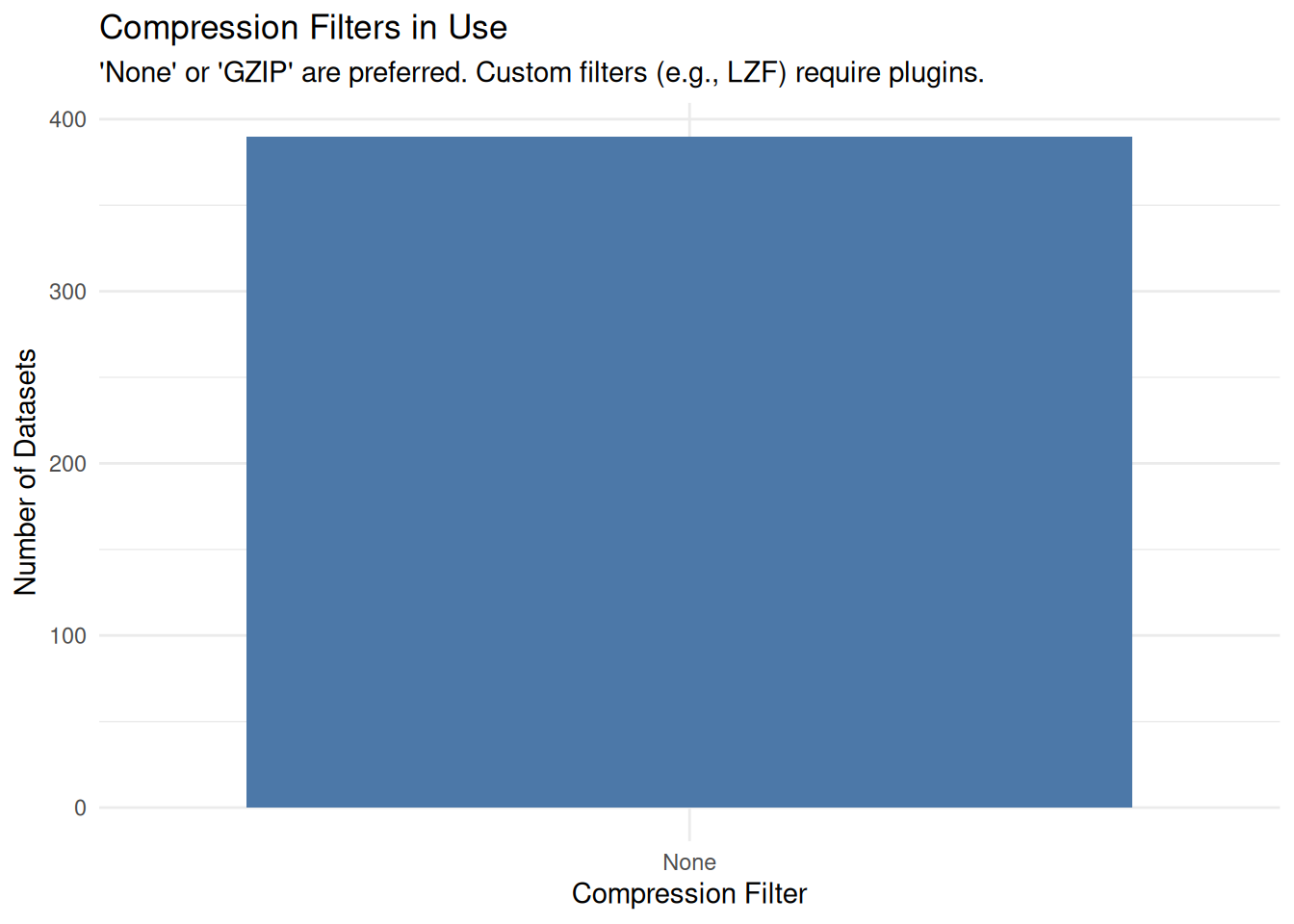
}Understanding how the data is stored (Compressed vs. Uncompressed) helps assess software dependencies.
if (exists("report") && nrow(report) > 0) {

  # Filter only for Datasets (exclude Groups)
  dataset_info <- report %>% filter(Type == "H5I_DATASET")

  if (nrow(dataset_info) > 0) {
    ggplot(dataset_info, aes(x = Compression)) +
      geom_bar(fill = "#4C78A8") +
      labs(
        title = "Compression Filters in Use",
        subtitle = "'None' or 'GZIP' are preferred. Custom filters (e.g., LZF) may require plugins.",
        x = "Compression Filter",
        y = "Number of Datasets"
      ) +
      theme_minimal()
  } else {
    message("No datasets found to visualize.")
  }
}
Save the dictionary to a CSV file for review.
# Define output directory
output_dir <- file.path("Results", "Inspect_hdf5")
dir.create(output_dir, recursive = TRUE, showWarnings = FALSE)

# Define filename
output_file <- file.path(output_dir, paste0("HDF5_Dictionary_", Sys.Date(), ".csv"))

# Write CSV
write.csv(report, output_file, row.names = FALSE)

print(paste("Data Dictionary saved to:", output_file))
[1] "Data Dictionary saved to: Results/Inspect_hdf5/HDF5_Dictionary_2026-07-03.csv"Use the generated CSV to perform these checks:
Proprietary Compression: If the Compression column lists “SZIP” (Science Data Process) or “LZF”, standard tools may fail to open the file in the future. GZIP (Deflate) is the safest standard (lossless and open).
External Links: If Type is EXTERNAL_LINK, the file is not self-contained. It relies on a target file that must also be present in the directory. If missing, the link is broken. Check the remaining files in the dataset to confirm the target file is included. If it is not present, contact the depositor to discuss.
Attribute Metadata: HDF5 is “Self-Describing” only if the researcher adds attributes. If the Attributes column is empty for major datasets, the data units (e.g., “Meters” vs “Feet”) are unknown without additional documentation outside the file. Check for this documentation in the rest of the dataset (e.g. README, data dictionary, codebook) or contact the depositor to request this information.
While R is excellent for scripted inspection, visual tools are often better for exploratory curation.
HDFView: The official Java-based visual browser maintained by The HDF Group. It allows you to click through the hierarchy, plot simple graphs, and edit attributes manually (see https://hdfgroup.org/downloads/hdfview/).
h5dump (Command Line): A utility that converts binary HDF5 content into human-readable text (ASCII or XML). It is helpful for generating archival dumps of metadata.
Panoply: A cross-platform data viewer specifically for HDF5 and NetCDF files that adheres to climate standards (CF Conventions).
For users who want to run this analysis on a server (HPC), in a batch job, or from the command line, here is the pure R script version.
Inspect_hdf5_Script.R ScriptDownload the R Script: Inspect_hdf5_Script.R
Inspect_hdf5_submit.sh)#!/bin/bash
#SBATCH --nodes=1
#SBATCH --ntasks=1
#SBATCH --time=00:20:00
#SBATCH --job-name=hdf5_check
# Load R module
module load R
# IMPORTANT: The 'hdf5r' package relies on the HDF5 system library.
# On many clusters, this must be loaded explicitly.
# Check your cluster docs (e.g. 'module avail hdf5')
module load hdf5
# Define directories
DATA_DIR="/scratch/your_user/scientific_data"
OUTPUT_DIR="/scratch/your_user/hdf5_results"
# Run Script
Rscript Inspect_hdf5_Script.R $DATA_DIR $OUTPUT_DIR